Czech Characters: How to Type and Copy Á, Č, Ř, Ů and More
Czech characters are the 15 accented letters Czech adds to the Latin alphabet: á č ď é ě í ň ó ř š ť ú ů ý ž, plus capitals. Copy them from the grid, type them on the Czech keyboard layout, or use Unicode codes such as 0159 then Alt+X in Word for ř, or press-and-hold on Mac and phones.

Czech characters are the 15 letters with diacritics that Czech adds to the basic Latin alphabet: á č ď é ě í ň ó ř š ť ú ů ý ž, plus their capitals. You can copy any of them from the grid above, type them on a Czech keyboard layout, or enter them on an English keyboard with Unicode codes, press-and-hold menus or dead keys. This page shows each method and when to use it.
The 30 Czech characters and their codes
Each Czech character has a fixed Unicode code point. The table also shows the Windows Alt code where one exists and the Microsoft Word shortcut (type the hex code, then press Alt+X).
| Letter | Unicode | Windows Alt code | Word |
|---|---|---|---|
| Á á | U+00C1 / U+00E1 | Alt+0193 / Alt+0225 | 00C1 / 00E1 then Alt+X |
| Č č | U+010C / U+010D | none / none | 010C / 010D then Alt+X |
| Ď ď | U+010E / U+010F | none / none | 010E / 010F then Alt+X |
| É é | U+00C9 / U+00E9 | Alt+0201 / Alt+0233 | 00C9 / 00E9 then Alt+X |
| Ě ě | U+011A / U+011B | none / none | 011A / 011B then Alt+X |
| Í í | U+00CD / U+00ED | Alt+0205 / Alt+0237 | 00CD / 00ED then Alt+X |
| Ň ň | U+0147 / U+0148 | none / none | 0147 / 0148 then Alt+X |
| Ó ó | U+00D3 / U+00F3 | Alt+0211 / Alt+0243 | 00D3 / 00F3 then Alt+X |
| Ř ř | U+0158 / U+0159 | none / none | 0158 / 0159 then Alt+X |
| Š š | U+0160 / U+0161 | Alt+0138 / Alt+0154 | 0160 / 0161 then Alt+X |
| Ť ť | U+0164 / U+0165 | none / none | 0164 / 0165 then Alt+X |
| Ú ú | U+00DA / U+00FA | Alt+0218 / Alt+0250 | 00DA / 00FA then Alt+X |
| Ů ů | U+016E / U+016F | none / none | 016E / 016F then Alt+X |
| Ý ý | U+00DD / U+00FD | Alt+0221 / Alt+0253 | 00DD / 00FD then Alt+X |
| Ž ž | U+017D / U+017E | Alt+0142 / Alt+0158 | 017D / 017E then Alt+X |
“None” means the character is not in the Windows-1252 code page that classic Alt codes use on English-language Windows. For those (Č, Ď, Ě, Ň, Ř, Ť, Ů), use the Word shortcut, the copy grid or a Czech layout. Code points are from the Unicode Latin-1 Supplement and Latin Extended-A blocks; the Unicode Latin Extended-A chart lists the háček letters.
Typing Czech characters on Windows
Option 1: add the Czech layout
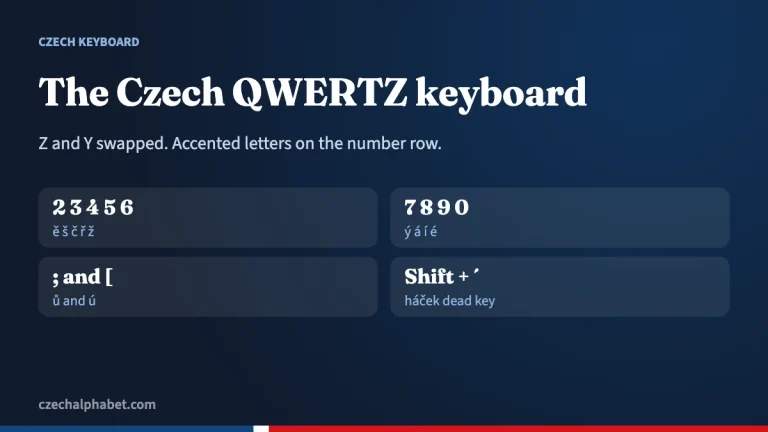
If you type Czech often, add the Czech keyboard in Settings. Its number row gives ě š č ř ž ý á í é without Shift, ú sits right of P and ů right of L. Two dead keys, two places right of 0, add the čárka (´) and, with Shift, the háček (ˇ) to any letter. Our Czech keyboard guide has the full map and setup steps.
Option 2: Alt codes
Hold Alt, type the four-digit code on the numeric keypad, release Alt. This works for the acute letters (á é í ó ú ý) and for š and ž, but only on systems using the Western code page. It does not work on most laptops without a numeric keypad.
Option 3: US-International
The US-International layout turns the apostrophe into a dead key, so ‘ then a gives á. It covers á é í ó ú ý but has no háček. You cannot type č, ř, š or ž with it, so it only solves half the problem.
Option 4: Word and Alt+X
In Microsoft Word, type the hex code and press Alt+X: 0159 becomes ř. Press Alt+X again to turn a character back into its code.
Typing Czech characters on a Mac
- Press and hold. Hold a letter key to open the accent menu, then click the version you want or press its number. Apple notes that the menu only appears for keys with accent options, so check that the letter you need is there.
- ABC – Extended. Apple recommends this input source for typing accents in several Latin-script languages. It uses Option dead keys: on this layout Option+V adds the háček and Option+E the acute accent, then you type the letter.
- Czech input source. For regular Czech typing, add Czech in System Settings > Keyboard > Input Sources.
Apple’s steps are in its guide to entering characters with accent marks on Mac.
Phones and tablets
On iPhone, iPad and Android, press and hold a letter to see its accented forms: hold c for č, r for ř, u for ú and ů. Adding the Czech keyboard (in iOS Keyboard settings or Gboard Languages) gives better suggestions and puts the háček letters one tap closer.
In HTML and code
Modern websites should simply save files as UTF-8 and type the letters directly. If you must escape them, use numeric references: ř for ř or ř in hex. Named entities exist only for some, such as š for š and á for á.
Removing Czech diacritics
Sometimes you need the opposite: a URL slug, an email address or an old system that rejects accents. The text box in the tool above strips them, turning příliš žluťoučký kůň (“far too yellow horse”, a pangram Czech typographers use for testing fonts) into “prilis zlutoucky kun”. Remember that stripped Czech is harder to read and sometimes ambiguous: byt (“apartment”) and být (“to be”) collapse into one word.
Common mistakes
- Using a look-alike character, such as â or ȓ, instead of the Czech letter. Copy from a trusted grid.
- Typing ˇ or ´ as a separate character after the letter instead of using a dead key.
- Typing t’ or d’ with a real apostrophe instead of ť or ď. The small hook on these letters is simply how the háček is drawn on tall letters.
- Confusing ů (ring) with ú (acute). They sound the same but are spelled by rules; see Czech spelling.
- Saving a file in an old encoding, which turns ř into “Å™”-style garbage. Use UTF-8.
For what each mark does to the sound, see Czech accents and the háček page, or browse every letter in the Czech alphabet chart.
Frequently asked questions
How do I type Czech characters on an English keyboard?
Copy them from the grid, use press-and-hold on Mac and phones, or in Word type the Unicode code (for example 0159 for ř) and press Alt+X.
Is there an Alt code for ř?
Not a classic Windows Alt code. Ř and ř are not in the Windows-1252 code page, so use Word’s Alt+X with 0158/0159, a Czech layout, or copy and paste.
Can I type č with US-International?
No. US-International handles the acute letters such as á and é, but it has no háček dead key.
What is the Unicode for ů?
U+016F for ů and U+016E for Ů.
How many Czech characters have diacritics?
Fifteen lowercase letters: á, č, ď, é, ě, í, ň, ó, ř, š, ť, ú, ů, ý and ž, each with a capital form.
Sources
- Unicode: Latin Extended-A code chart
- Apple Support: Enter characters with accent marks on Mac
- kbdlayout.info: Microsoft Czech keyboard layout (KBDCZ) tables
- Wikipedia: Ř (Unicode encoding)